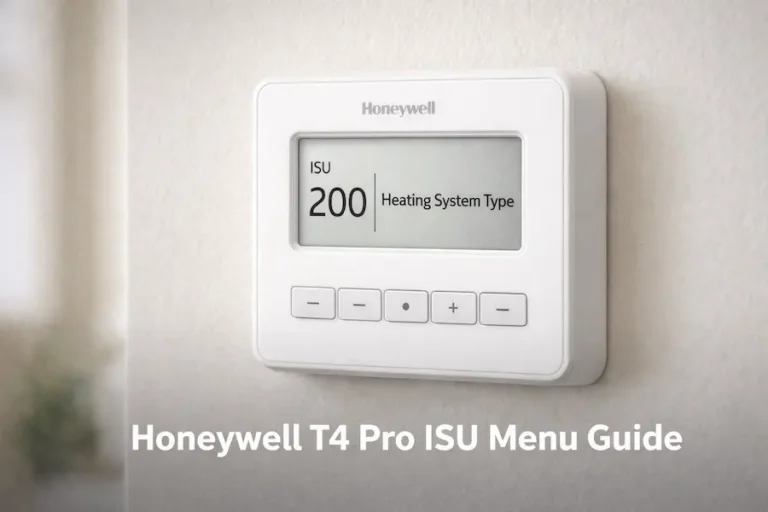
Honeywell T6 Pro ISU Menu: Complete Installer Setup Guide
The Honeywell T6 Pro ISU menu controls how the thermostat operates after installation, but heating or cooling may not respond when this setup is skipped or configured incorrectly. This issue is common on models like TH6320U2008, TH6220U2000, and TH6210U2001, where the system type must match the actual equipment.
For installation and wiring details, see the Honeywell T6 Pro thermostat manual.
Quick Answer
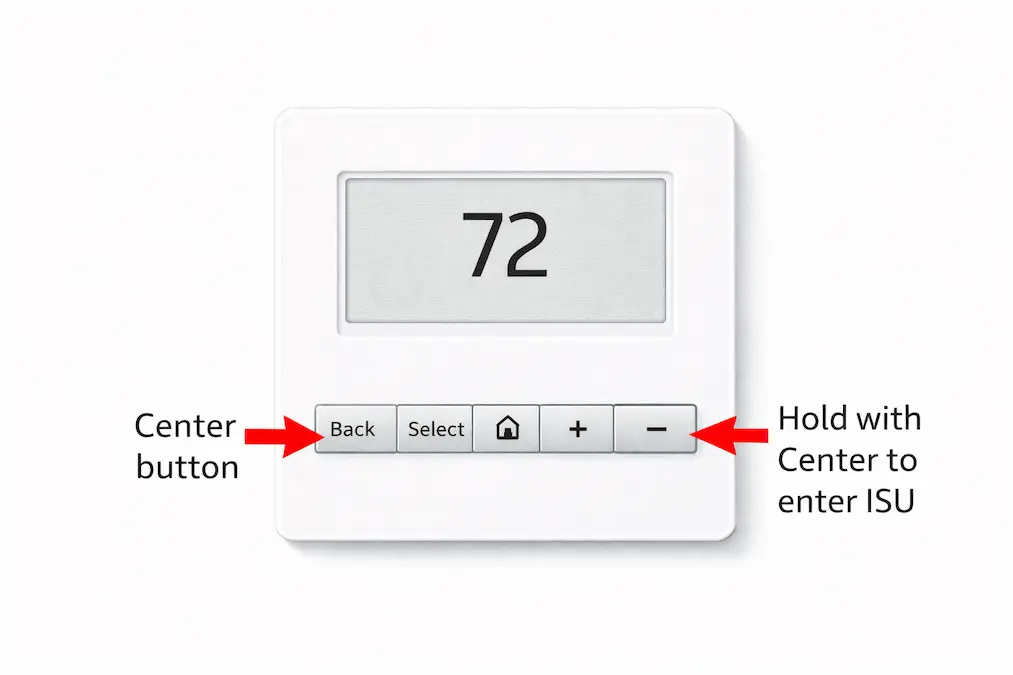
The Honeywell T6 Pro ISU menu is the installer setup menu used to configure system types, reverse valve behavior, fan control, and compressor protection. To access it, press and hold the centre button and the + button for about 3 seconds, then select ISU from the advanced menu.
T6 Pro ISU Settings at a Glance
The table below covers the six settings most likely to affect whether your system heats and cools correctly. Full details for every setting follow in the sections below.
| ISU Number | Setting Name | Why It Matters |
|---|---|---|
| ISU 120 | Scheduling options | Sets whether the thermostat is programmable and which format |
| ISU 200 | Heating system type | Most critical setting — must match your actual HVAC equipment |
| ISU 218 | O/B reversing valve | Heat pump only — wrong setting causes heating and cooling to reverse |
| ISU 230 | Fan control in heat | Determines whether thermostat or equipment controls the blower |
| ISU 300 | System changeover | Sets whether Auto mode is manual or automatic |
| ISU 387 | Compressor protection | Prevents short cycling — should stay at default 5 minutes |
What Is the Honeywell T6 Pro ISU Menu?
The Honeywell T6 Pro ISU menu is the installer setup configuration system used to match the thermostat with the HVAC system it controls. It allows technicians to configure heating system type, compressor stages, reversing valve behavior, fan control, and temperature limits.
ISU stands for Installer Setup. The ISU menu does not control daily temperature or scheduling. It controls the relationship between the thermostat and the HVAC equipment behind the wall. The menu can be re-entered after installation at any time without losing programming data.
What does ISU stand for on a Honeywell thermostat?
ISU stands for Installer Setup. It is the built-in configuration menu that allows a technician to match the thermostat to the specific type of HVAC equipment it controls.
Which ISU setting is most important on the T6 Pro?
ISU 200 is the most important setting. It tells the thermostat whether the system is conventional forced air, a heat pump, or radiant heat, and an incorrect value here prevents the system from heating or cooling at all.
How many ISU settings does the T6 Pro have?
The T6 Pro has over 30 individual ISU settings organised across six groups. Most residential installations only require changes to two or three settings, with the remaining settings left at factory defaults.
The T6 Pro belongs to the Honeywell Home Pro Series product line manufactured by Resideo Technologies. If you are installing the thermostat for the first time, see the full Honeywell T6 Pro thermostat manual for wiring diagrams and document guidance before entering the ISU menu.
Quick Summary
ISU stands for Installer Setup. The menu is accessed once at installation and can be re-entered at any time. ISU 200 system type is the most important setting. ISU 218 controls the O/B reversing valve for heat pump systems. ISU 120 sets the scheduling format. ISU 387 controls compressor protection. Not all ISU options appear on all three T6 Pro model variants.
Which T6 Pro Models Have the ISU Menu?
All three T6 Pro variants include the ISU menu. The available settings differ depending on the model. Check your model number label on the back of the thermostat before following any ISU instructions.
| Model | ISU Menu | Key Differences |
|---|---|---|
| TH6320U2008 | Full ISU — all options available | Heat pump advanced settings, outdoor sensor, emergency heat, 2 compressor stages |
| TH6220U2000 | Full ISU — most options available | Outdoor sensor support, heat pump, single compressor stage only |
| TH6210U2001 | Partial ISU | Single compressor stage only, no emergency heat settings, no outdoor sensor |
How to Access the Honeywell T6 Pro ISU Menu
⚠ Warning Before Changing ISU Settings
Changing installer settings incorrectly can cause the thermostat to control the wrong equipment or prevent the system from heating or cooling. If you are unsure about your HVAC system type, check the system wiring or consult the installation manual before modifying any ISU settings.
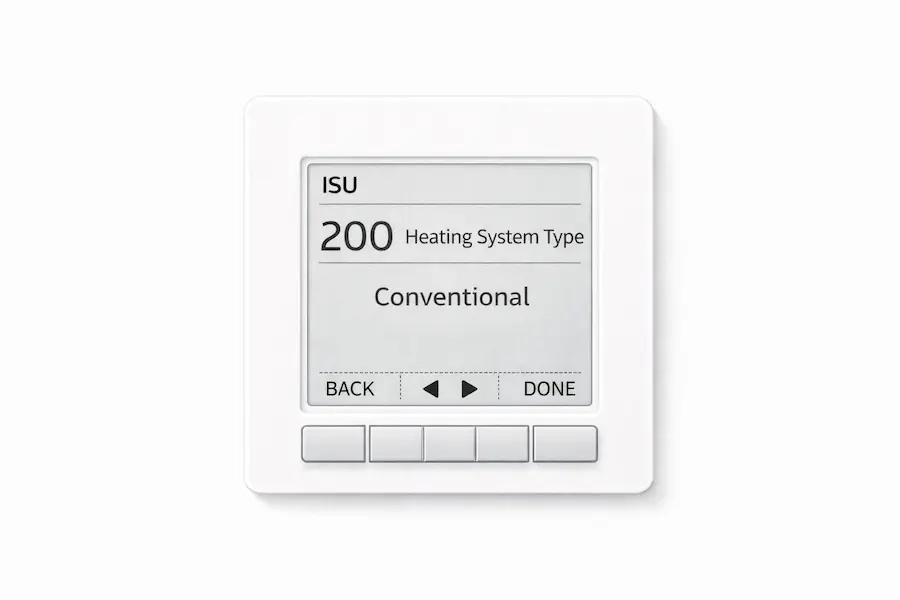
The ISU menu is accessed through the advanced menu. The button sequence is the same on all three T6 Pro variants.
Button Sequence
- Press and hold the Center button and the + button at the same time for approximately 3 seconds.
- The display shows the advanced menu. ISU will appear as one of the options.
- Press Select to enter the ISU menu.
- Press Select to cycle forward through individual ISU settings.
- Press + or minus to change the value of the currently displayed setting.
- Press Select to confirm and move to the next setting.
- Press Back to return to the previous setting without changing it.
- Press Home when finished. All selected values are saved automatically.
Navigating Between Settings
Not all ISU numbers appear in sequence. The menu skips settings that do not apply to your current configuration. For example, ISU 218 for the O/B reversing valve only appears if ISU 200 is set to heat pump. This is normal behaviour and matches the official Resideo installation guide.
Saving and Exiting
Press Home at any point to save all changes and return to the home screen. The thermostat does not have a separate save prompt. If you press Back repeatedly instead of Home, changes to the last viewed setting may not be saved. Always press Home to exit.
SU Group 100: Display and Scheduling Settings
Group 100 settings control how the thermostat displays information, and what scheduling options are available to the homeowner. These settings do not affect heating or cooling equipment directly.
| ISU | Name | Options | What to Set |
|---|---|---|---|
| 120 | Scheduling options | 0=Non-programmable, 2=5-2, 3=5-1-1 (default), 4=7-day | Match your preferred schedule format. Set to 0 if no schedule needed. |
| 125 | Temperature scale | 0=Fahrenheit (default), 1=Celsius | Match homeowner preference |
| 130 | Outdoor sensor | 0=None (default), 1=Wired outdoor sensor | TH6320U and TH6220U only. Set to 1 only if sensor is physically wired. |
ISU Group 200: Heating System Settings (Most Critical)
Group 200 is the most important section of the ISU menu. ISU 200 tells the thermostat what type of heating system it is controlling. An incorrect entry here causes the thermostat to operate the wrong equipment or produce no response at all. Set ISU 200 before any other setting in this group.
| ISU | Name | Options | What to Set |
|---|---|---|---|
| 200 | Heating system type | 1=Conventional forced air (default), 2=Heat pump, 3=Radiant heat, 5=Cool only | Must match your actual system. Wrong value causes complete failure to heat or cool. |
| 205 | Heating equipment type | 1=Standard gas, 2=High efficiency gas, 3=Oil, 4=Electric, 7=Air-to-air heat pump, 8=Geothermal, 9=Hot water radiant | Select the closest match to your equipment type. Check your equipment documentation if unsure. |
| 218 | Reversing valve O/B | 0=O energised in cool (default), 1=B energised in heat | Check your heat pump manual. Most systems use O. Trane and some others use B. |
| 220 | Compressor stages | 0=None, 1=Single stage (default), 2=Two stage | TH6210U supports single stage only. TH6220U limited to 1 stage when configured as heat pump. |
| 221 | Heat stages / backup heat stages | Heat: 1 (default) or 2. Backup: 0 or 1 (default) | Match your equipment stages. Most residential systems are single stage. |
| 230 | Fan control in heat | 1=Equipment controls fan, 2=Thermostat controls fan (default) | Use 2 for most systems. Use 1 for systems with their own fan control board. |
| 253 | Aux/E terminal control | 0=Drive both Aux and E together (default), 1=Independent | TH6320U only. Leave at default unless your system requires independent control. |
| 255 | Backup heat source | 1=Electric forced air (default), 2=Gas/oil forced air | Heat pump only. TH6320U and TH6220U only. Match your backup heat type. |
| 256 | Emergency heat source | 1=Electric forced air (default), 2=Gas/oil forced air | TH6320U only. Match your emergency heat equipment. |
| 260 | External fossil fuel kit | 0=Thermostat controls backup heat (default), 1=External kit controls backup | TH6320U and TH6220U only. Leave at 0 unless an external fossil fuel kit is installed. |
How to Identify Your System Type for ISU 200
If you are replacing an existing thermostat, check the old thermostat wiring. If the O/B terminal had a wire connected, your system is a heat pump. If only R, W, Y, G, and C terminals were used with no O/B wire, your system is conventional. If you are unsure, check the outdoor unit. A heat pump outdoor unit has both heating and cooling capability and will have a model number you can search to confirm.
ISU Group 300: System Changeover and Heat Pump Balance Settings
Group 300 settings control how the thermostat switches between heating and cooling and how it manages heat pump auxiliary and emergency heat. Most conventional system installations will only need to set up ISU 300. The remaining settings in this group apply to heat pump systems only.
| ISU | Name | Options | What to Set |
|---|---|---|---|
| 300 | System changeover | 0=Manual (default), 1=Automatic | Set to 1 to enable Auto mode on the thermostat display |
| 303 | Auto changeover differential | 0 to 5 degrees F (default 0) | Only applies when ISU 300 is set to Automatic. Sets minimum degrees before mode switches. |
| 340 | Backup heat droop | 0=Comfort (default), 2 to 15 degrees F | Heat pump only. Controls when backup heat activates. Leave at comfort unless efficiency is a priority. |
| 350 | Upstage timer for backup heat | 0=Off (default), 30 minutes to 16 hours | Sets how long heat pump runs before backup heat is allowed to engage |
| 355 | Compressor lockout / balance point | Off (default), 5 to 60 degrees F | Prevents compressor from running below a set outdoor temperature |
| 356 | Outdoor lockout backup heat | Off (default), 5 to 65 degrees F | Prevents backup heat from running above a set outdoor temperature |
ISU Group 400: Comfort, Protection and Temperature Limit Settings
Group 400 covers compressor protection, Adaptive Intelligent Recovery, temperature setpoint limits, and keypad lockout. Most of these settings can be left at factory defaults for residential installations.
| ISU | Name | Options | What to Set |
|---|---|---|---|
| 387 | Compressor protection | 0=Off, 1 to 5 minutes (default 5) | Leave at default 5 minutes. Turning this off risks compressor damage from short cycling. |
| 425 | Adaptive Intelligent Recovery | 0=No, 1=Yes (default) | Leave on. AIR starts heating or cooling early so the room reaches setpoint on schedule. |
| 430 | Minimum cool setpoint | 50 to 99 degrees F (default 50) | Prevents accidental cooling setpoints below this value |
| 431 | Maximum heat setpoint | 40 to 90 degrees F (default 90) | Prevents accidental heating setpoints above this value |
| 435 | Keypad lockout | 0=None/Disabled (default), 1=Partial or Enabled, 2=Full | 0=No lock, 1=Partial lock, 2=Full lock. Options vary by firmware version. Check your installation guide. |
ISU Group 500: Indoor Sensor Settings
Group 500 settings apply only to the TH6320U2008 and TH6220U2000 models. They control whether and how a remote wired indoor temperature sensor is used. If no remote sensor is installed, leave all Group 500 settings at their defaults.
| ISU | Name | Options | What to Set |
|---|---|---|---|
| 500 | Is indoor temperature sensor wired? | 0=No (default), 1=Yes | TH6320U and TH6220U only. Set to 1 only if a remote wired sensor is physically connected. |
| 515 | Indoor sensor type | 0=10k (default), 1=20k | TH6320U and TH6220U only. Match the resistance specification of your wired sensor. |
| 520 | Which sensors control temperature? | 1=Thermostat only, 2=Wired only, 3=Average (default) | TH6320U and TH6220U only. Average uses both sensors for more stable temperature control. |
ISU Group 700: Maintenance Reminder Settings
Group 700 settings configure air filter replacement reminders. These settings are optional and do not affect heating or cooling operation. Setting a filter reminder is a useful addition for rental properties and homes where the owner may forget routine maintenance.
| ISU | Name | Options | What to Set |
|---|---|---|---|
| 702 | Number of air filters | 0 (default), 1, or 2 | Set to match how many air filters your system has. Enables filter reminder alerts. |
| 711 | Air filter 1 replacement reminder | 0=Off (default), run time days, or calendar months | Set a reminder schedule based on your filter manufacturer recommendation |
| 712 | Air filter 2 replacement reminder | 0=Off (default), run time days, or calendar months | Only applies if ISU 702 is set to 2 |
The Five ISU Settings Most Installers Get Wrong
These five errors account for the majority of T6 Pro post-installation callbacks. Check each one before closing the installation.
| ISU Setting | Common Mistake | Correct Action |
|---|---|---|
| ISU 200 | Set to Conventional when system is a heat pump | Check your outdoor unit. If it has a reversing valve it is a heat pump. Set to 2. |
| ISU 218 | O/B valve left at default O when system needs B | Check your heat pump installation manual. Trane and American Standard typically need B. |
| ISU 230 | Left at Equipment Controls Fan when system needs Thermostat Controls | Most residential systems should be set to 2 Thermostat Controls Fan |
| ISU 120 | Left at 5-1-1 default when homeowner wants 7-day scheduling | Change to 4 for full 7-day programming after discussing with homeowner |
| ISU 387 | Compressor protection turned off to speed up testing | Always restore to 5 minutes after testing. Leaving it off risks compressor damage. |
What the Manual Tells You to Check First
Use this table when something is wrong after installation. Each symptom maps directly to an ISU setting.
| What You See | What the Manual Calls It | Where to Find It |
|---|---|---|
| System not heating or cooling after install | Incorrect system type | ISU 200 — check heating system type setting |
| Heating and cooling modes are reversed | O/B valve setting error | ISU 218 — verify O or B setting matches equipment |
| Fan runs continuously | Fan control setting | ISU 230 — check fan control in heat setting |
| Cool On or Heat On flashing | Compressor protection delay | ISU 387 — normal operation, wait 3 to 5 minutes |
| Auto mode not available on display | Manual changeover setting | ISU 300 — set to 1 for automatic changeover |
| Schedule not working as expected | Scheduling format mismatch | ISU 120 — confirm scheduling option matches setup |
How to Reset the T6 Pro ISU Menu to Factory Defaults
If ISU settings were entered incorrectly and you want to start over, the T6 Pro supports a full factory reset. Enter the advanced menu by pressing and holding Center and + for 3 seconds. Navigate to Reset and press Select. Choose “Factory Reset” and confirm. This clears all ISU settings, schedules, and time settings. All ISU entries must be re-entered from the beginning after a factory reset.
A factory reset does not affect the wiring or the physical UWP wall plate. After resetting, re-enter the ISU menu and begin with ISU 200 before powering on the HVAC system. If you need broader troubleshooting after a reset, the Honeywell Thermostat Not Working guide covers system-level diagnostics.
Download the Honeywell T6 Pro Installation Manual
You can download the official Honeywell T6 Pro Installation Instructions Guide free from Resideo. This document covers all wiring diagrams, terminal descriptions, and the complete ISU menu reference.
An Installer’s Perspective on the T6 Pro ISU Menu
The T6 Pro ISU menu looks intimidating when you see 30 settings listed in the installation guide. In practice, most residential installations require changes to three settings only: ISU 200 for system type, ISU 218 if the system is a heat pump, and ISU 120 if the homeowner wants a specific schedule format. Everything else can stay at factory default.
The settings that cause the most callbacks are ISU 200 and ISU 218. Getting the system type wrong at ISU 200 means the thermostat sends the wrong signal to the equipment. Getting ISU 218 wrong on a heat pump means heating and cooling are physically reversed. Both problems are invisible during a quick test but become obvious on the first cold or hot day. Verify both settings before leaving the installation.
This article was reviewed for technical accuracy against the official Honeywell Home T6 Pro Installation Instructions Guide published by Resideo Technologies.
Frequently Asked Questions
Conclusion
The Honeywell T6 Pro ISU menu contains over 30 settings, but most residential installations come down to three: ISU 200 for system type, ISU 218 for heat pump O/B valve direction, and ISU 120 for scheduling format. Set these correctly, and the remaining settings can stay at factory defaults.
For a complete overview of the T6 Pro thermostat, including wiring diagrams and document guidance, see the full Honeywell T6 Pro thermostat manual guide. For differences between the T6 Pro, T4 Pro, and T1 Pro models, the Honeywell Pro Series thermostat guide covers the full comparison. Also, For a general overview of installer setup menus, read this thermostat installer setup guide.